Sell your knowledge. Beyond the studio too.
With Academy you create online courses for your members and dancers. You add lessons with video, publish them right away or on a date, and dancers buy access through your own Mollie.
Academy is an add-on to every plan.
How it works
You build everything in the back office, the way you are used to.
Create a course
A title, a description, an image and a price. That is all you need to start.
Add lessons
Each lesson has one or more videos. You upload them in the back office, straight from your computer.
Publish now or on a date
Put the whole course online at once, or schedule it so a new lesson appears every week.
Dancers buy access
You decide how long access lasts, for example 3, 6 or 12 months. A week before it ends they get a reminder to renew.
What schools and teachers use it for
Everything you explain in class that dancers want to see again at home.
Technique training
Basic steps, turns, posture and timing, in short lessons to repeat at home.
Choreography
A choreography in parts, so your group can practise between classes.
Teacher training
Your teaching method for new and regular teachers, in one place everyone can find it.
Workshop preparation
The basics in advance, so the workshop itself can go into the real work.
Complete online programmes
A full course from start to finish, with a new lesson every week.
Academy is for dance schools, and also for organisers and independent teachers. Baila will later use the module for its own courses on baila.me/academy.
What dancers see
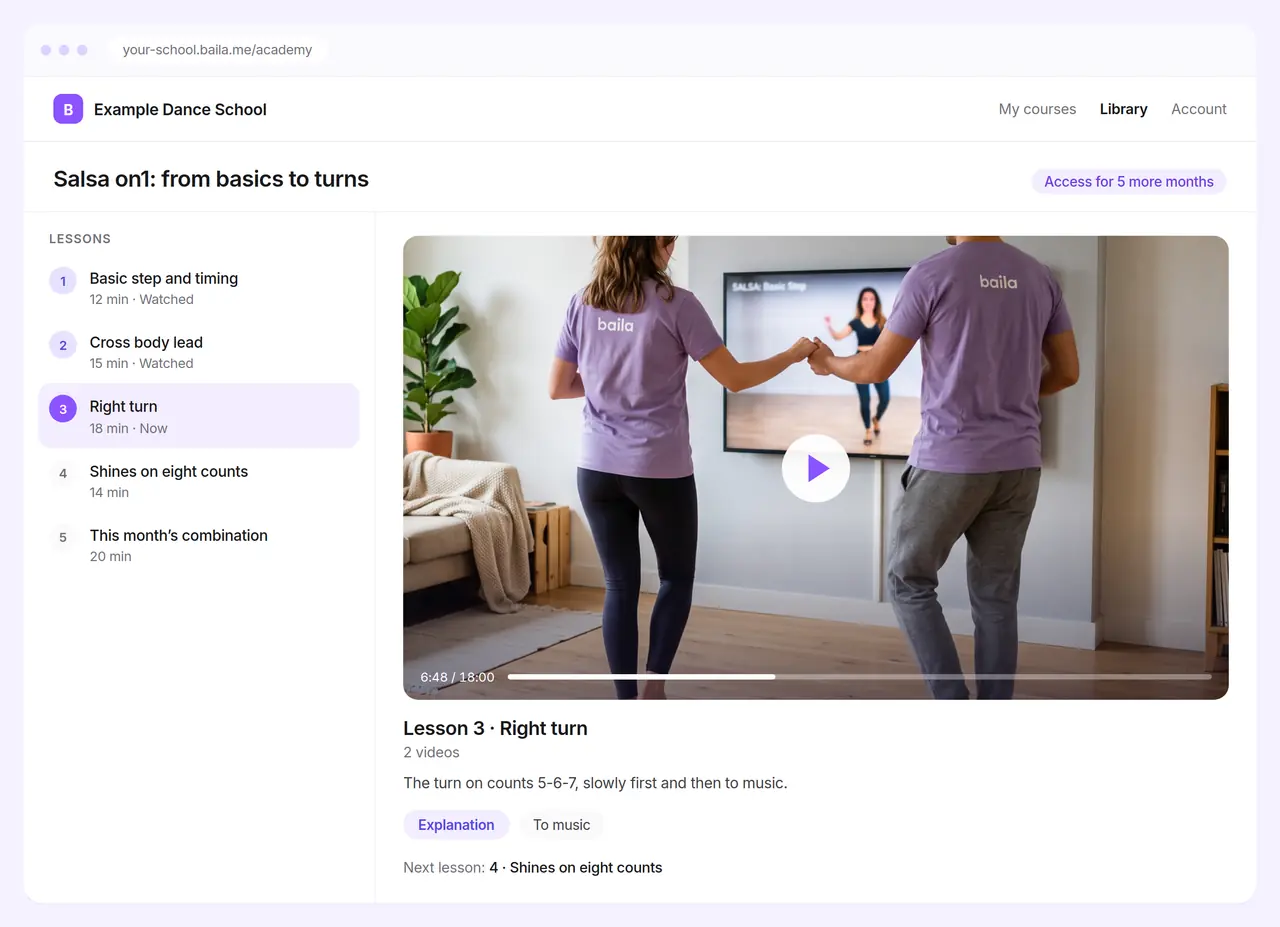
A separate, calm library at your school’s address, apart from your schedule and your shop.
- Lesson list and player
- The course lessons on the left, the player on the right. A lesson with several videos lists them one below the other.
- In any order
- Anyone with access clicks freely through the lessons. There is no fixed route.
- Keeping track
- Lessons a dancer has already seen are marked as watched.
- A preview on Discover
- The demos on your Discover profile show how you teach before anyone buys a course.
Payment goes through your own Mollie
Dancers pay through your own Mollie account and the money goes straight to you. For that you need Payments, which you switch on for free.
Fees per payment on the pricing pageWhat Academy costs
Academy is an add-on in every plan. The three tiers differ only in the number of courses; the features are the same.
Basis
To start with one or two courses.
Up to 5 courses
€ 19
per month excl. VAT
Choose Basis- Each video up to 60 minutes
- Publish lessons now or on a date
- Set the access period per course
- Payment through your own Mollie
Recommended
Plus
For a school with several courses side by side.
Up to 20 courses
€ 39
per month excl. VAT
Choose Plus- Each video up to 60 minutes
- Publish lessons now or on a date
- Set the access period per course
- Payment through your own Mollie
Pro
For a large archive or complete online programmes.
Unlimited courses
€ 79
per month excl. VAT
Choose Pro- Each video up to 60 minutes
- Publish lessons now or on a date
- Set the access period per course
- Payment through your own Mollie
For example: a course of 10 lessons, one video per lesson.
Academy is subject to fair use of storage and data traffic. As a guideline: about 10 videos per course and at most 60 minutes per video. In case of exceptional use, such as a very large course, we contact you first. See article 9.4 of the terms and conditions (in Dutch).
Plans, Payments and the fees per payment are on the pricing page.
Frequently asked questions
What do I need?
A Baila environment with Payments, so dancers can pay through your own Mollie. You switch Payments on for free. On top of that you add Academy in one of the three tiers.
How long do dancers have access?
You set that per course, for example 3, 6 or 12 months. A week before it ends they get a reminder to renew.
Which videos can I upload?
MP4 and MOV. If you film with an iPhone, go to Settings, Camera, Formats and choose Most Compatible. The iPhone then records in H.264, which plays everywhere.
Can I schedule lessons in advance?
Yes. You give each lesson a publication date. On that date it appears in the library, for example a new one every week.
Can I switch tiers?
Yes. If you create more courses you move to a larger tier; if you need less, to a smaller one. You arrange this through [email protected].
What if a course has many videos?
Fair use of storage and data traffic applies. As a guideline we count on about 10 videos per course of at most 60 minutes. If a course gets much larger, we contact you first; an upload is not simply refused.
From physical class to online academy. One Baila experience.
You teach in the studio and put the same knowledge online. Dancers pay through your own Mollie and watch in your school’s library.